Agree on the behaviors that matter in your house. Check the days together. Celebrate every milestone on the way to something they really want.
14 days free, then $4.99/month for the whole family. Cancel anytime.
Answer a few questions, swipe to keep what matters, connect their phone. That's it.
A points chart for families with kids and teens. Every little thing counts.
Compass asks one thing at a time: your kids, their ages, what's hardest at home and what they'd love to earn. Answer by voice, by typing or with a tap. Prefer a shortcut? Start from a ready card for their age, or snap your paper chart.
Each behavior comes up as a card. Swipe right to keep it, left to skip it: first the points to earn, then the slips that cost points. Change any words or points, then tap Start.
Your kid scans a QR code from your phone and they're in. No email, no account. They see their own week and jar, and nothing else. No phone yet? Keep the chart on yours.
Tick each day as it happens, in the app or right from the Home Screen widget. Kids can log their own checks on their phone, and a parent approves with a tap. Every Sunday, Compass sums up the week for you.
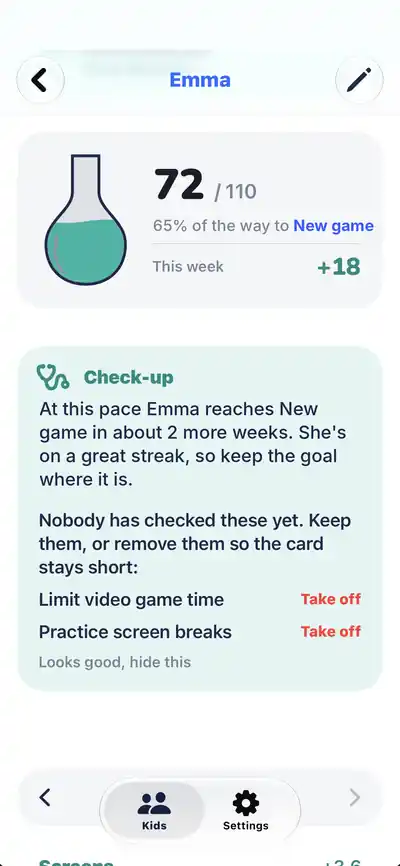
Pick something your kid really wants, like a new toy, a sleepover or a day out, and set how many points it takes. Aim for about three good weeks. The jar fills as they earn, with a celebration at every milestone. When it's full, you award the prize and choose the next one.
See every kid's jar at a glance, and tick today's habits without opening the app.
“Give Leo points in Compass Goals.” Siri checks it off for today. In English, French and Spanish.
Step-by-step answers to “how do I…?” right inside the app, plus Sign in with Apple and undo for a mistaken tap.
Three steps. The same ones that worked in our kitchen.
Answer a few questions or start from a ready card for their age (10+, or a lighter one for 7–10), then swipe to keep the behaviors that matter. Positive points and deductions. Name the prize.
Seven circles per behavior, Monday to Sunday. Parents fill it in, or kids log their own days and a parent approves with a tap. Habits build up over the week; events count in full.
Every check pours a little more into the jar, with confetti at 25%, 50% and 75%. When it's full, a parent awards the prize and you set the next one.
Every Sunday morning, wherever you live, Compass shows a short recap of the week: for parents, a card for each kid; for kids, their own week with a cheer.
Adds kids, chooses behaviors and points, names the goal, invites the other adults. Changes anything, any time.
Other parents, a grandparent, a nanny. They see the same kids and approve or log, without touching the rules.
No email, no account. They scan a QR code from a parent's phone (or type a short code) on their phone or iPad. They see their own week and jar, and nothing else.
A weekly list of the things that actually mattered in our house (homework without reminders, telling the truth when it was hard, the phone off at night) with points toward something my son really wanted.
Within a few weeks, both my kids were checking their own boxes before I asked, debating whether Tuesday counted, and watching the jar fill. Less nagging. More “look what I did.”
“Kids don't need another chart. They need to see, not just hear, that good choices bring the prize closer.”— Vanessa, who made Compass for her own kids
One subscription covers every kid and every adult in the family.
Cancel anytime in your iPhone's Settings. Cancelling during the trial means you're never charged.
No. A parent creates the family; each child scans a QR code from the parent's phone (or types a short code) and joins from their own phone or iPad. No email, no password, no personal information collected from the child.
They can propose. Their checks show as dotted circles until a parent approves them. Only approved checks add to the jar.
Because that's how a family agreement works. Lying costs more than forgetting a notebook. You decide every value, and you can run a positive-only list if you prefer.
Each kid's points for the week, how close they are to their goal, their best habit, the one to work on, and checks waiting for approval. It shows in the app on Sunday morning. Parents can also get it by email by turning it on in Settings; it's off unless you ask for it, and kids never get emails.
Kids old enough to have a phone or iPad, roughly 10 and up, with a lighter starter list for 7 to 10. The lists are starting points; everything is editable.
Yes. Invite the other parent as a Family Member; both of you see the same kids and the same week.
Prefer paper, or want to get the most out of a points chart? Start here.
Ten practical rules to set phone limits your teen will follow, starting with sleep.
A simple formula to price rewards so kids keep trying, with example prices for kids and teens.
Five changes that make a points chart work for 12- to 17-year-olds.
How to use deductions fairly: few, clear, agreed in advance and paired with a positive.
Free for 14 days. One subscription for the whole family.